Start with the purpose
Decide whether the session is easy running, tempo work, intervals, long-run structure, recovery, or race-specific practice.
Give the workout a clear name so it is easy to find later in RunSync and Garmin Connect.
 Log inBuild a Workout
RunSync help guide
Structured workouts turn a training idea into clear steps you can review in RunSync and, when supported, follow from a compatible Garmin watch.
Decide whether the session is easy running, tempo work, intervals, long-run structure, recovery, or race-specific practice.
Give the workout a clear name so it is easy to find later in RunSync and Garmin Connect.
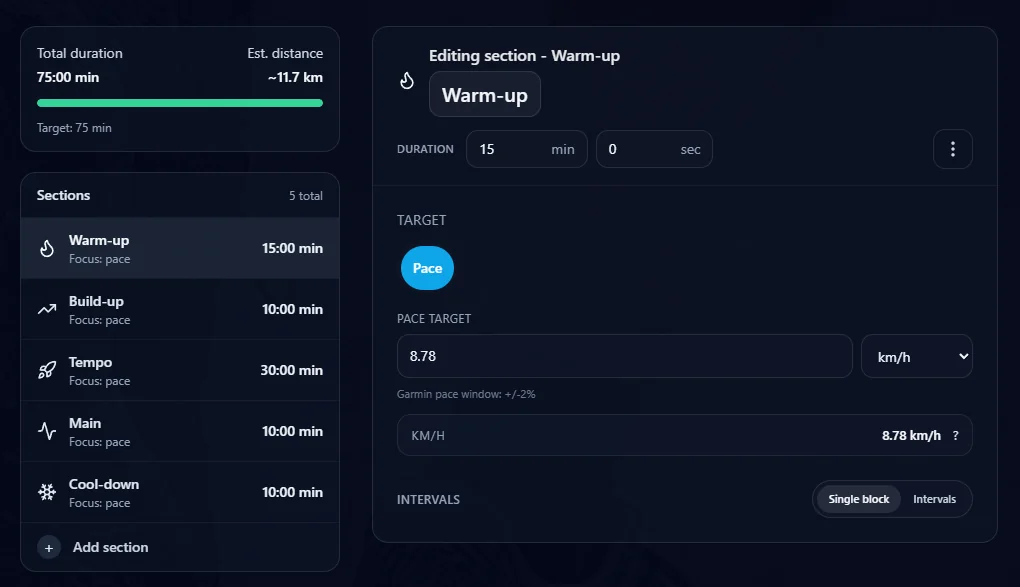
In Run Builder, choose Add section to add warm-up, main work and cool-down sections. Select a section to edit its duration and target. Use Intervals when that section needs repeated work and recovery steps.
Intervals usually repeat a work step and a recovery step, such as 6 x 3 minutes hard with 2 minutes easy.
Signed-in RunSync Run and Complete members can save workouts and reuse templates for repeated sessions.
When training paces are available, pace-based workouts can use current pace guidance instead of fixed manual targets.