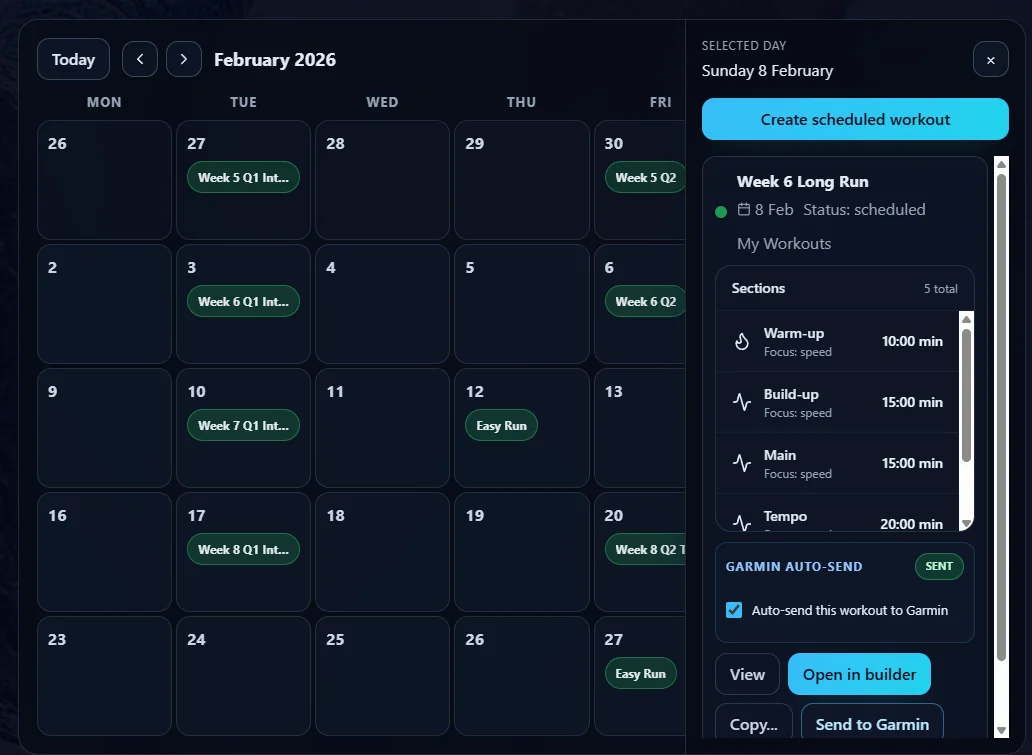
Example Calendar view: select a day to review its sessions and automatic delivery settings.
On Complete, open Calendar, select a date and choose Create workout to start Run Builder with that date. Review the workout before scheduling it.
A calendar view makes it easier to balance quality sessions, easy days, long runs and rest.
Build a training block
A training block is a planned sequence of workouts over several weeks.
RunSync is designed to help turn repeated templates and structured sessions into a practical block you can review before committing.
Set and forget
"Set and forget" means planning the workout once, scheduling it for the correct date, and using Garmin auto-send so RunSync sends eligible workouts to Garmin on the day they are required.
You should still check Garmin Connect and your watch before running an important session.