Go Beyond One Pace: Build Sub-Threshold and Over/Under Workouts
Explore threshold pace ranges, build sub-threshold and over/under running workouts in RunSync, then plan your session and send it to Garmin Connect.
A quality session can do more than repeat the same pace. Controlled sub-threshold efforts, sustained tempo running and over/unders give you different ways to organise your harder running. Clear targets make those choices easier to plan and follow.
RunSync’s Advanced pace settings let you explore eight intensity bands from one threshold reference. Choose a band, create an editable session and adapt its work and recovery targets. Save it for reuse, plan it in your calendar and send it to Garmin Connect so a compatible watch can guide the changes.
This guide follows a 5:30/km example reference into a sub-threshold session, then shows how to build an alternating under/over variation. The opportunity is to put a more purposeful workout on your watch with less setup each time. Use your own current reference and a workload that fits your training.
What is a threshold pace reference?
The reference is a single pace representing your estimated threshold effort. RunSync describes it as a hard effort sustainable for about 45–60 minutes. It is a calculation input, not a laboratory measurement or proof that you should hold that pace today.
For context, Jack Daniels describes threshold intensity using an effort that could be raced for almost an hour under ideal conditions. The eight bands below are RunSync’s own definitions; they are separate from the Daniels-style race-result calculation in Part 1.
Before using the results, check where the reference came from. Advanced uses:
- Your saved threshold reference, if you have explicitly saved one.
- Otherwise, the midpoint of your saved Threshold range, if available.
- Otherwise, an example threshold reference of 5:30/km.
You can also enter a reference manually, including one agreed with your coach. The source label changes to identify manual input. A saved reference takes priority over the saved-range midpoint, so check it again after a new race or a change in fitness.
The 5:30/km used here makes the calculation easy to follow. It is not a suggested starting pace for everyone.
LT1, LT2 and the space between them
Two lactate thresholds help describe the range of endurance efforts:
- LT1, the first threshold, marks the initial sustained rise in blood lactate above its lower exercise levels. Running below it is commonly used for low-intensity endurance work.
- LT2, the second threshold, marks a higher-intensity breakpoint in the lactate response. Training descriptions often use “threshold” to refer to work around this upper boundary.
- Between LT1 and LT2, the effort is higher than easy running but below the upper threshold. This is useful territory to distinguish when planning sustained aerobic work.
For example, a training study in recreational runners separated low, moderate and high intensities using individually tested LT1 and LT2. RunSync’s percentage bands are estimates from one reference; they do not locate both of your thresholds. A Tempo or Sub-threshold label cannot confirm that you are between your measured LT1 and LT2.
You can explore a broader change from steadier running towards upper-threshold work, or alternate just below and above the upper threshold. Over/unders usually describe the second approach. An “under” near LT2 may still be well above LT1, so it can remain demanding running.
Why use over/unders?
The intended benefit is sustained aerobic work with controlled changes in demand: lift the effort briefly, then settle back into purposeful running. That also gives you practice changing pace and regaining a controlled rhythm, a useful skill when a race includes surges or changes in terrain.
Lactate is part of the fuel supply during exercise. George Brooks’ review of lactate shuttle research explains how lactate moves between tissues and can be used for energy. This provides a physiological rationale for working across intensities; it does not establish that any particular over/under recipe is superior training.
The easier phase matters. In a study of 11 trained male runners, active rather than passive recovery produced higher mean oxygen uptake and lower post-session lactate, but also greater perceived effort, without more time above 90% of VO2max. That was an acute interval study, not a long-term test of over/unders. Keeping the “under” brisk adds load; lower lactate alone does not prove a better workout.
Open Advanced and preview your intensity ranges
For the signed-in settings route:
- Open My training settings.
- Choose Running paces, then expand Advanced.
- Find Explore intensities from a threshold pace and read the source label.
- Check or enter the Estimated threshold pace in minutes and seconds, with the correct Pace unit.
- Select Preview intensity ranges after changing the input.
You can also use the public Threshold Pace Calculator without signing in. Calculation is available without saving a reference; account saving is a separate action.
The results are labelled Threshold-based estimates. After you edit the input, the old results remain marked Based on previous inputs · Preview until you preview again. Use the updated results before creating a workout.
Why 95–99% of threshold speed gives a slower pace
The percentages apply to speed, rather than to the minutes-per-kilometre number. They are also separate from heart-rate percentages.
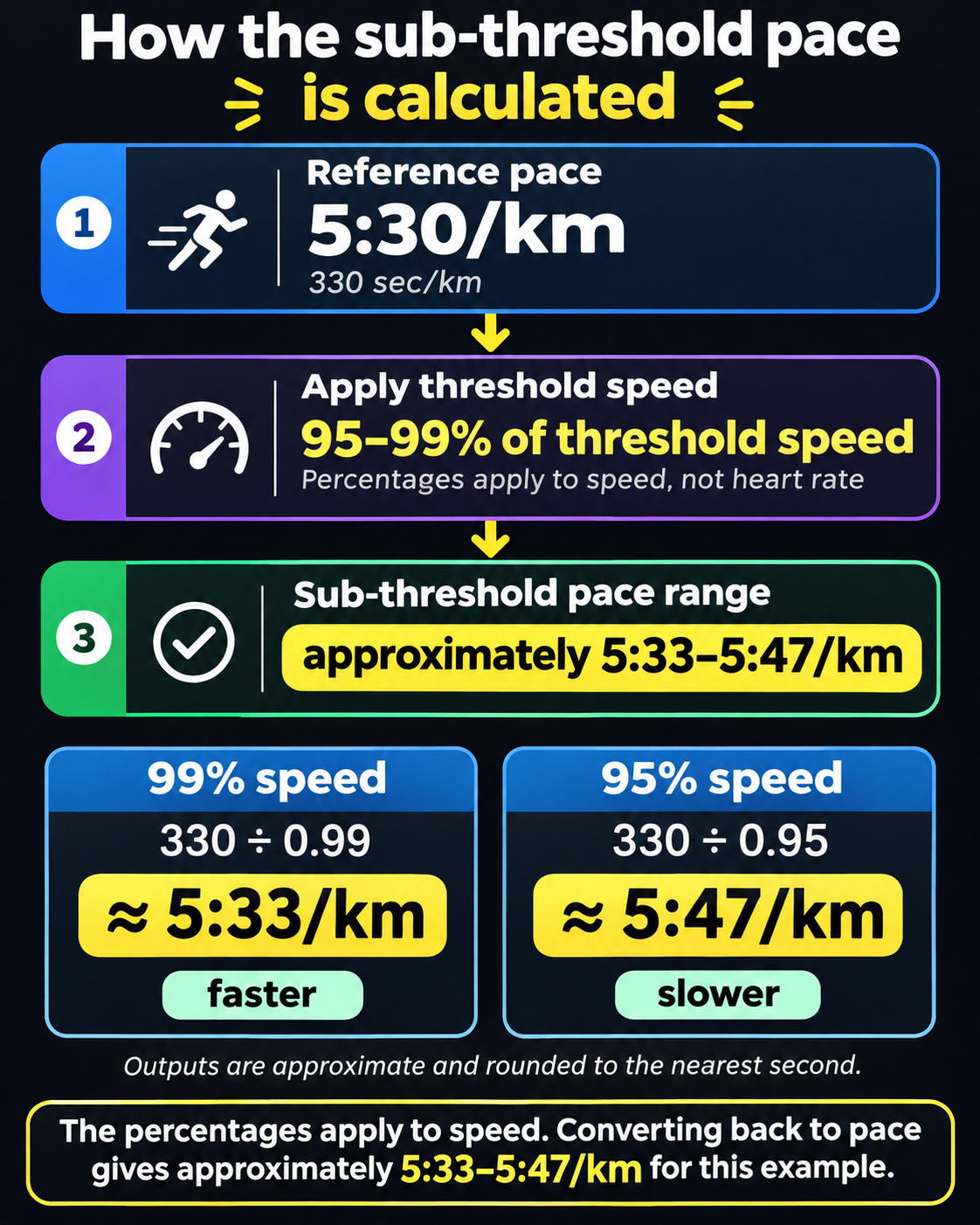
A 5:30/km reference is 330 seconds per kilometre. To find the Sub-threshold band, RunSync applies 95–99% to the corresponding speed, then converts back to pace:
- Faster boundary: 330 ÷ 0.99 = about 333 seconds/km, displayed as 5:33/km.
- Slower boundary: 330 ÷ 0.95 = about 347 seconds/km, displayed as 5:47/km.
The displayed range is therefore 5:33–5:47/km, in Faster → Slower order. Lower speed means more time to cover a kilometre. Multiplying 330 seconds by 95% would make the pace faster, which would reverse the intended meaning.
You do not need to calculate this yourself when using the tool. The example explains why the numbers move in that direction and why a sub-threshold range sits slower than the reference.
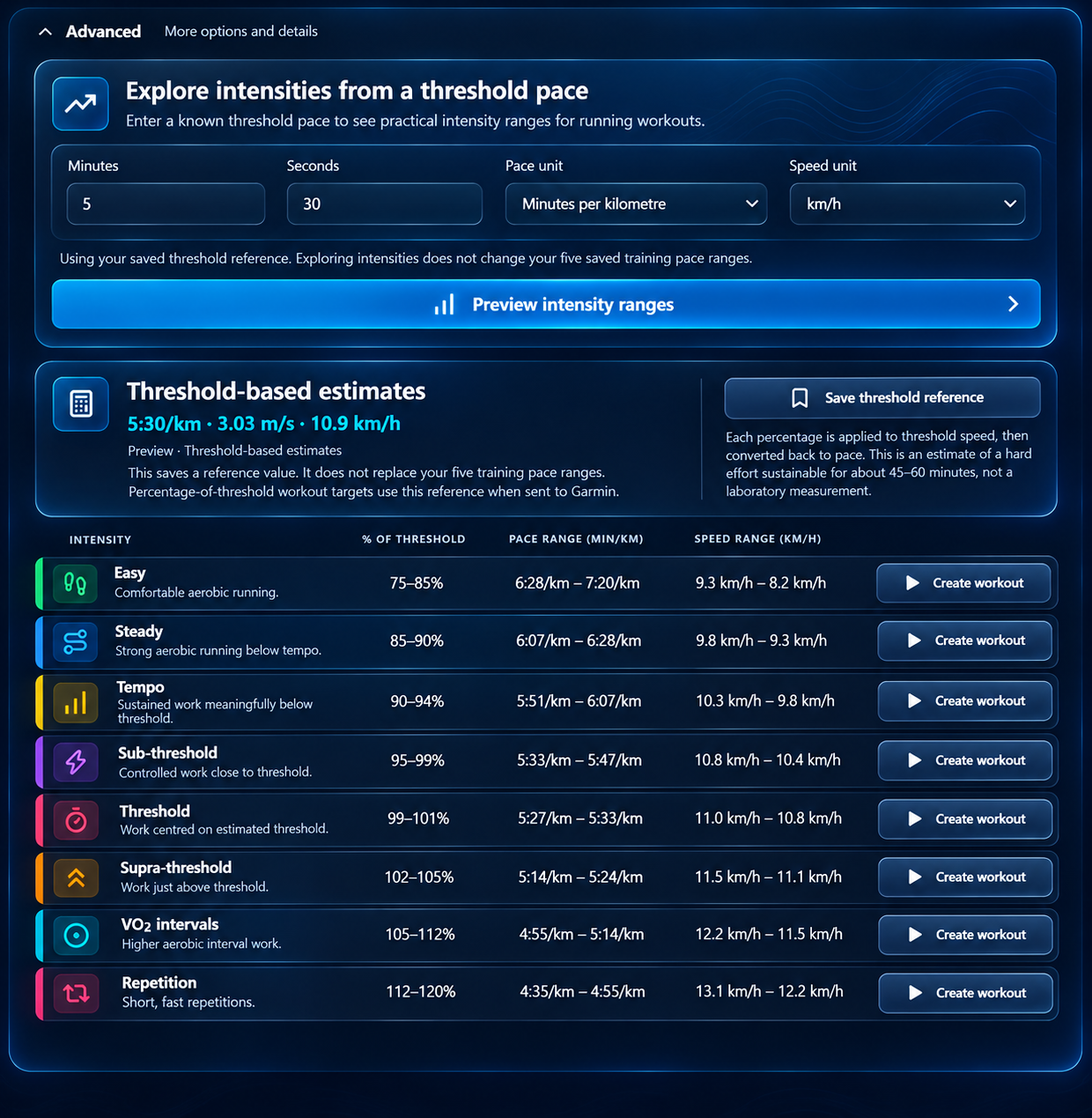
The eight RunSync intensity bands
Each band uses the same reference, with a different speed percentage. With 5:30/km as the reference, the displayed estimates are:
| Band | Threshold speed | Example pace, Faster → Slower |
|---|---|---|
| Easy | 75–85% | 6:28–7:20/km |
| Steady | 85–90% | 6:07–6:28/km |
| Tempo | 90–94% | 5:51–6:07/km |
| Sub-threshold | 95–99% | 5:33–5:47/km |
| Threshold | 99–101% | 5:27–5:33/km |
| Supra-threshold | 102–105% | 5:14–5:24/km |
| VO2 intervals | 105–112% | 4:55–5:14/km |
| Repetition | 112–120% | 4:35–4:55/km |
These are selectable product bands, not universal physiological zones. The definitions include gaps and shared boundaries. They do not establish your individual lactate thresholds or measure your VO2max.
In this calculator, Tempo is below Threshold. Coaching terminology varies, so read the percentage and actual range rather than relying on the name alone.
The Advanced Threshold result also need not match your separately saved Threshold range. In Part 1, the illustrated saved range was 5:24–5:36/km. This Advanced example gives about 5:27–5:33/km from a 5:30/km reference. They come from different calculations.
Build a sub-threshold workout
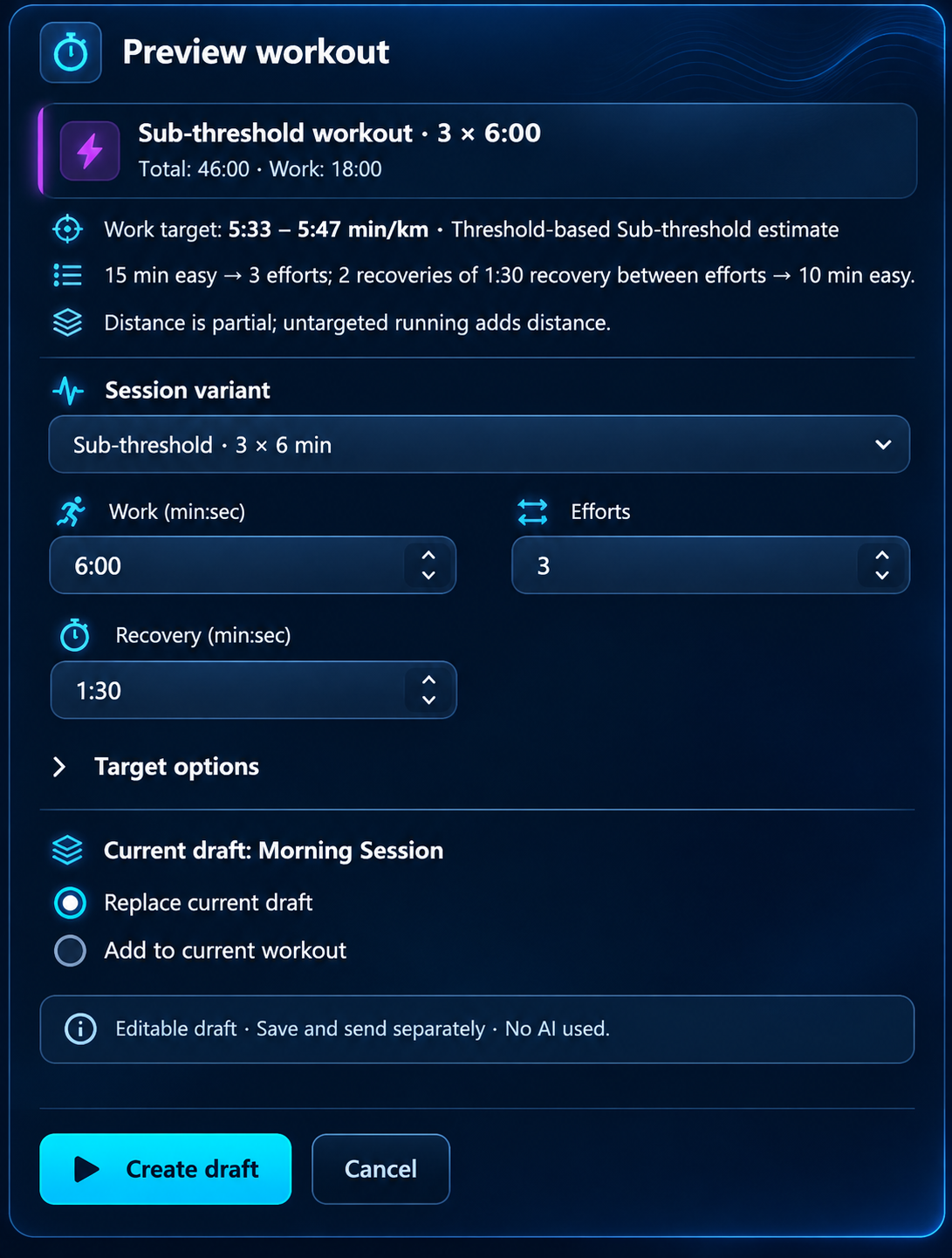
Beside Sub-threshold, select Create workout. The preview starts with Sub-threshold · 3 × 6 min:
Sub-threshold example · 46 minutes total
- 15 minutes easy warm-up.
- Three efforts of 6 minutes at the selected Sub-threshold range.
- 90 seconds easy recovery between efforts: two recoveries in total.
- 10 minutes easy cool-down.
For this reference, the work target is approximately 5:33–5:47/km, identified as a Threshold-based Sub-threshold estimate. Check that source and range before continuing.
Under Target options, keep Use full selected range to copy both boundaries into every effort. Use midpoint is a different target choice; it does not preserve the selected bounds in the same way.
There are 18 minutes of work, 3 minutes of recovery and 25 minutes of warm-up and cool-down. That adds up to 46 minutes. After the third effort, the session moves directly into the cool-down; there is no extra recovery after the final effort.
What targets do the easy sections use?
Advanced generation leaves warm-up, recovery and cool-down at Run by feel, without pace or heart-rate targets. It does not automatically apply your saved Easy range. You can review those sections in the builder and add targets if wanted.
The time total is complete, but distance is partial because those untargeted sections still add running. Do not treat a distance subtotal as the distance for the whole session.
Adjust Work, Efforts or Recovery in the preview if needed, then select Create draft to open Run Builder. This uses no AI and has not saved, scheduled or sent the workout.
If a draft already exists, review Replace current draft or Add to current workout. Adding appends the whole generated session, including its warm-up and cool-down. Cancel leaves the existing draft alone.
How do threshold and faster sessions differ?
Changing category changes both the selected range and the starting workout structure. The Advanced defaults include:
| Band | Work | Recovery between efforts | Total with warm-up and cool-down |
|---|---|---|---|
| Sub-threshold | 3 × 6 min | 90 sec | 46 min |
| Threshold | 3 × 5 min | 60 sec | 42 min |
| Supra-threshold | 5 × 2 min | 90 sec | 41 min |
| VO2 intervals | 4 × 3 min | 2 min | 43 min |
| Repetition | 6 × 45 sec | 2 min | 39 min 30 sec |
These are editable RunSync templates. They do not assess your training history or prescribe the next session you should run. A shorter total session can still use a faster work range, so compare work, recovery and intensity together.
Turn the draft into an under/over session
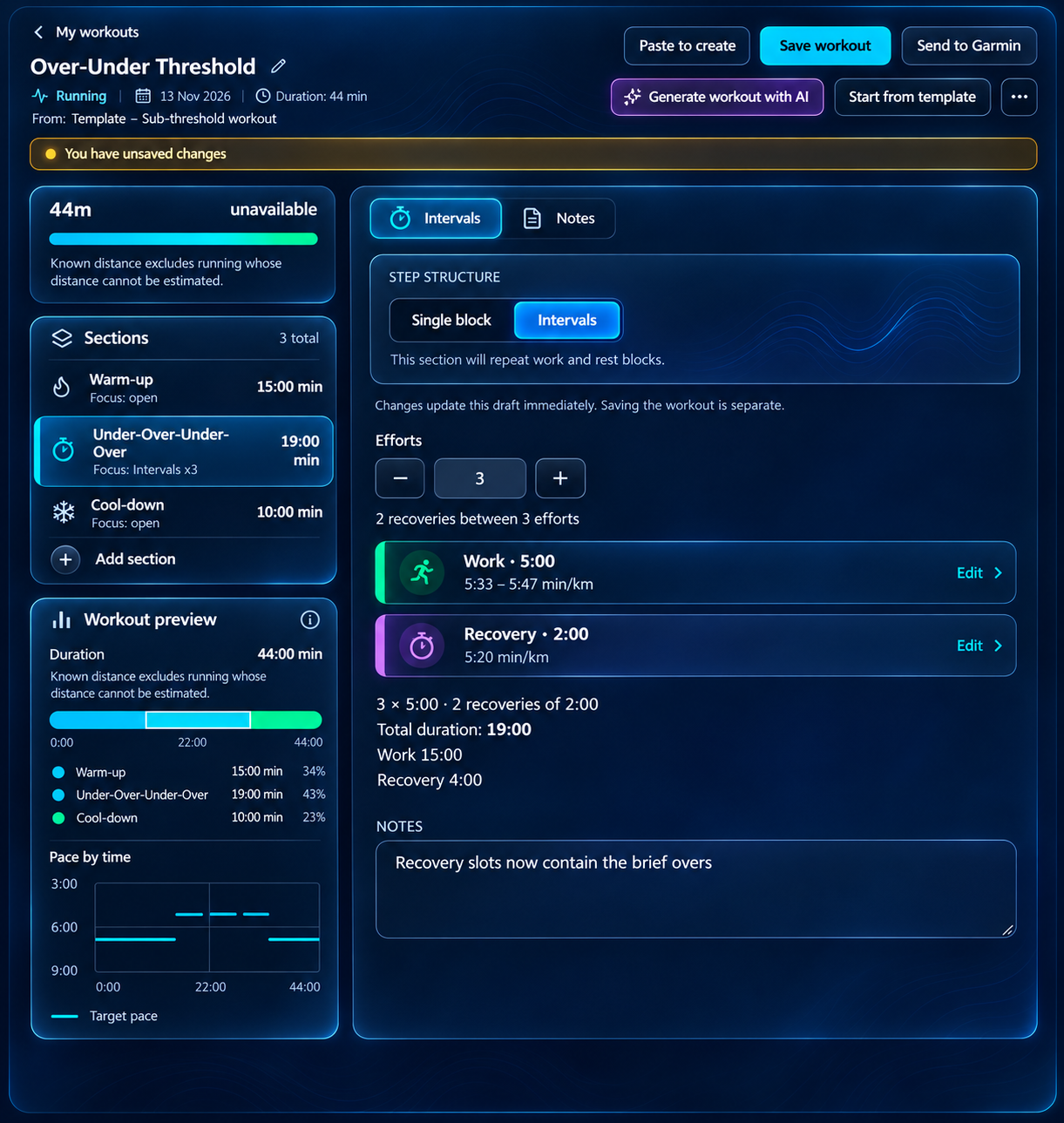
RunSync’s separate work and recovery controls let you build alternating targets. The calculator creates a single-intensity starting template; you make the over/under variation in Run Builder.
Here is an editing example using the same 5:30/km reference. Keep the Sub-threshold range for the longer “under” phases and use 5:20/km for the brief “overs”, a custom pace within this example’s Supra-threshold band:
Alternating main set · 19 minutes
5 min under → 2 min over → 5 min under → 2 min over → 5 min under
- Under: the copied 5:33–5:47/km Sub-threshold range.
- Over: a custom 5:20/km target.
- With 15 minutes easy warm-up and 10 minutes easy cool-down: 44 minutes total.
To build this variation from the sub-threshold draft:
- Open the interval editor. Keep 3 efforts and change Work to 5:00, retaining its copied Sub-threshold target.
- Change Recovery to 2:00. These two between-effort slots will become the brief “overs”.
- In Recovery target, choose Pace, then Custom pace, and enter 5:20 with min/km units. Check the displayed watch alert bounds for this custom target.
- Rename the interval section to describe the under/over pattern. Although the editor calls those slots Recovery, they now contain faster running. Review the expanded sequence: three unders, two overs, then cool-down.
- On mobile, choose Apply changes. Desktop controls update the working draft immediately; saving remains separate.
This is a continuous alternating block with no easy recovery inside the main set: 15 minutes under plus 4 minutes over. It is more demanding than its 44-minute total might suggest. The numerical targets illustrate the builder workflow, not verified crossings of your measured LT2 or a prescribed progression from the 46-minute session.
Save a reference or create a workout: what changes?
Previewing lets you explore without adopting new account settings. The separate save and draft actions have different purposes:
| Action | What it does |
|---|---|
| Save training paces | Replaces all five saved training pace ranges, including manual adjustments. |
| Save threshold reference | Stores the single Advanced reference; leaves the five saved ranges unchanged. |
| Create draft | Copies the selected numeric target into an editable workout; leaves both sets of settings unchanged. |
You do not need to save the reference before previewing a workout. To store it, choose Save threshold reference; signed-out users are directed to sign in. Storing the five training pace ranges is a separate feature available with Run or Complete. Saving or sending workouts follows the normal account and plan requirements.
Changing the reference later does not update these generated workouts. Their targets are copied numbers. Generate a fresh session or deliberately edit an existing one when you want to use updated ranges.
Review the session before you run
Choose a workload you can manage at a controlled effort. Reducing the effort count or work duration is a valid edit; the template does not require you to compensate by running faster. Allow for hills, heat, wind and fatigue when judging the target.
For a broader discussion of changing pace and workload, see how to progress threshold pace.
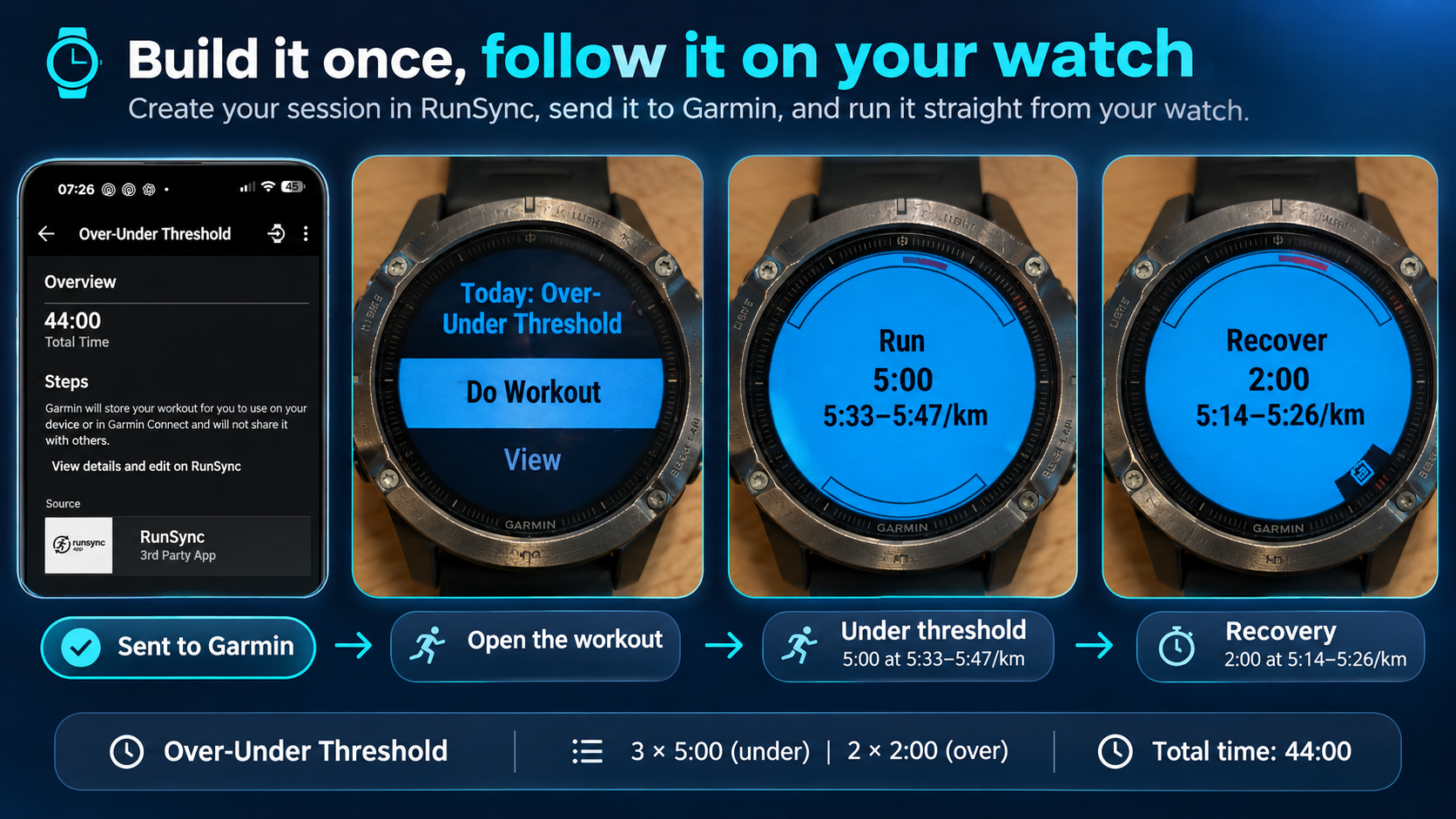
Build it once, follow it on your watch
Alternating sessions become easier to execute when each phase is already planned. RunSync connects the calculation to that practical task:
- Choose the intensity. Preview the bands from your reference and use the range that fits the session’s purpose.
- Build the changes. Adjust durations and separate targets, then review the order and total workload.
- Save and plan. Keep the workout for reuse and schedule it in your calendar with the appropriate account access. Place it within your training week, allowing recovery around it.
- Send and sync. Connect Garmin, send the reviewed workout to Garmin Connect, then sync it to a compatible watch. Follow its step timing and supported target alerts during the run.
You can have the session ready before you leave: warm-up, controlled work, pace changes and cool-down. For a runner exploring more advanced workouts, that removes a practical barrier to using them consistently. Here, efficiency means less workout setup and clearer execution; fitness gains still depend on suitable training and recovery.
Part 3 will cover the editing and sending controls in detail. For the full delivery steps now, follow the guide to sending a structured workout to Garmin Connect. Sending to Connect and syncing to a device are separate steps; check Garmin connection, plan and device requirements there.
Put a more purposeful session on your watch
Explore your ranges, build the pace changes and plan your next quality session. Start with a sub-threshold draft, then shape the workout to fit your training.
Build from my threshold pace