Calculate Heart Rate Zones and Build a Run Around Them
Calculate running heart rate zones with the Karvonen method, save your BPM ranges in My Account, and build Garmin workouts that target the whole zone.
You want an easy run to stay easy, but a target of one exact heart rate is awkward to follow. Your heart rate moves as the route, weather and effort change. A useful Zone 2 target is a range you can run within.
RunSync’s heart rate zone calculator turns your maximum and resting heart rate into five BPM ranges. You can save those ranges in My Account, then use the full range as a target in a structured running workout.
How does the Karvonen method calculate heart rate zones?
The Karvonen method uses heart rate reserve (HRR): the difference between your maximum heart rate and your resting heart rate. It applies an intensity percentage to that reserve, then adds your resting heart rate back in.
Heart rate reserve = maximum heart rate − resting heart rate
Target heart rate = resting heart rate + (heart rate reserve × intensity)
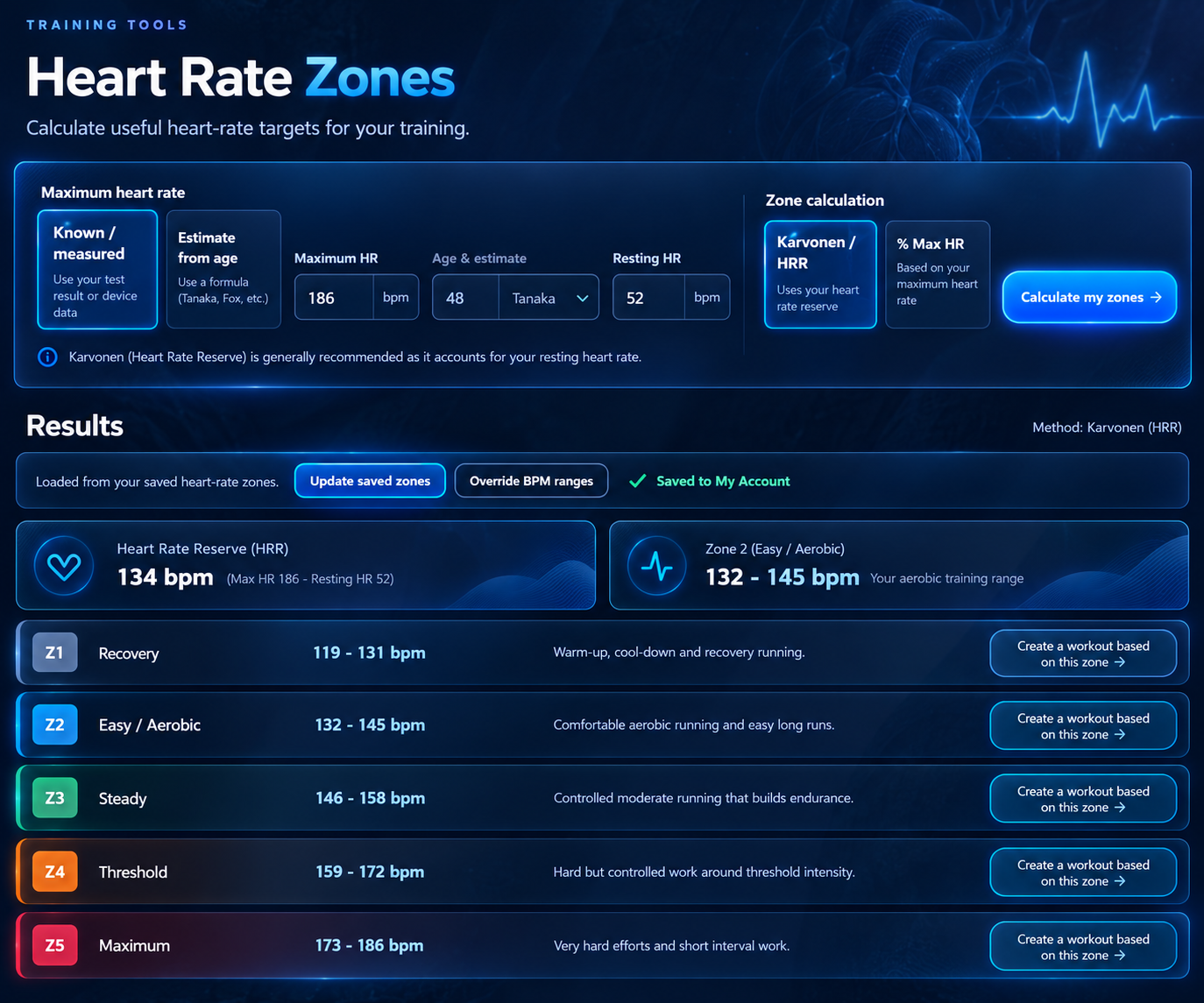
For example, with a maximum heart rate of 186 bpm and a resting heart rate of 52 bpm, your reserve is 134 bpm. At 60% HRR, the calculation is 52 + (134 × 0.60) = 132.4 bpm. At 70% HRR, it is 52 + (134 × 0.70) = 145.8 bpm.
RunSync uses 60% to below 70% HRR for Zone 2. It rounds each boundary to a whole BPM and keeps adjacent zones from overlapping, so this example appears as 132–145 bpm for Zone 2. The next zone begins at 146 bpm.
This differs from the % Max HR method, which multiplies a percentage directly by maximum heart rate and does not use resting heart rate. RunSync offers both methods. Karvonen is the default when you have a useful resting heart rate value; % Max HR is available if you want to calculate without one. The American College of Sports Medicine’s HRR example uses the same reserve-and-add-back calculation.
Calculate your zones in RunSync
Open Heart Rate Zones and choose how to set your maximum heart rate. You can enter a known value, or estimate it from your age using the Tanaka or Fox formula. The Tanaka estimate is 208 − (0.7 × age); it comes from research on age-predicted maximum heart rate. An age formula is a starting estimate, and your own measured value may differ.
Next, enter your resting heart rate and choose Karvonen / HRR, or choose % Max HR if you are calculating without a resting value. The results show five named zones and their BPM ranges, with Zone 2 highlighted in the summary. You can also override the calculated BPM ranges if you already use personalised zones.
These zones are training guides. Heat, hills, fatigue and normal heart rate lag can change what a pace feels like on a given day. Use the ranges alongside your effort, especially if an easy run no longer feels easy.
Save your heart rate settings in My Account
The calculator works before you sign in. To keep your settings for future workouts, sign in and select Save my zones beneath the results. RunSync stores your maximum heart rate, your resting heart rate when Karvonen uses it, your chosen method, and the five BPM ranges.
Open My Account → Heart Rate Zones to see those saved ranges. The Update zones link returns you to the calculator when you want to change an input or adjust a range. Your saved zones are then available in Run Builder, so you do not need to type the BPM limits into every workout step.
Create a Zone 2 workout with the whole BPM range
The quickest route is the Create a workout based on this zone button beside Zone 2 in the calculator results. RunSync opens an easy-run template in Run Builder with heart rate targets filled in. Review the workout and adjust its duration or steps before saving or sending it to Garmin.
You can also start in Run Builder. Set a step’s target to Heart rate, then choose Zone 2 from your saved heart rate zones. The selector shows its low and high BPM values. If your Zone 2 is 132–145 bpm, the workout step targets 132–145 bpm, not just the midpoint. Run Builder shows the exact range that will be sent to Garmin.
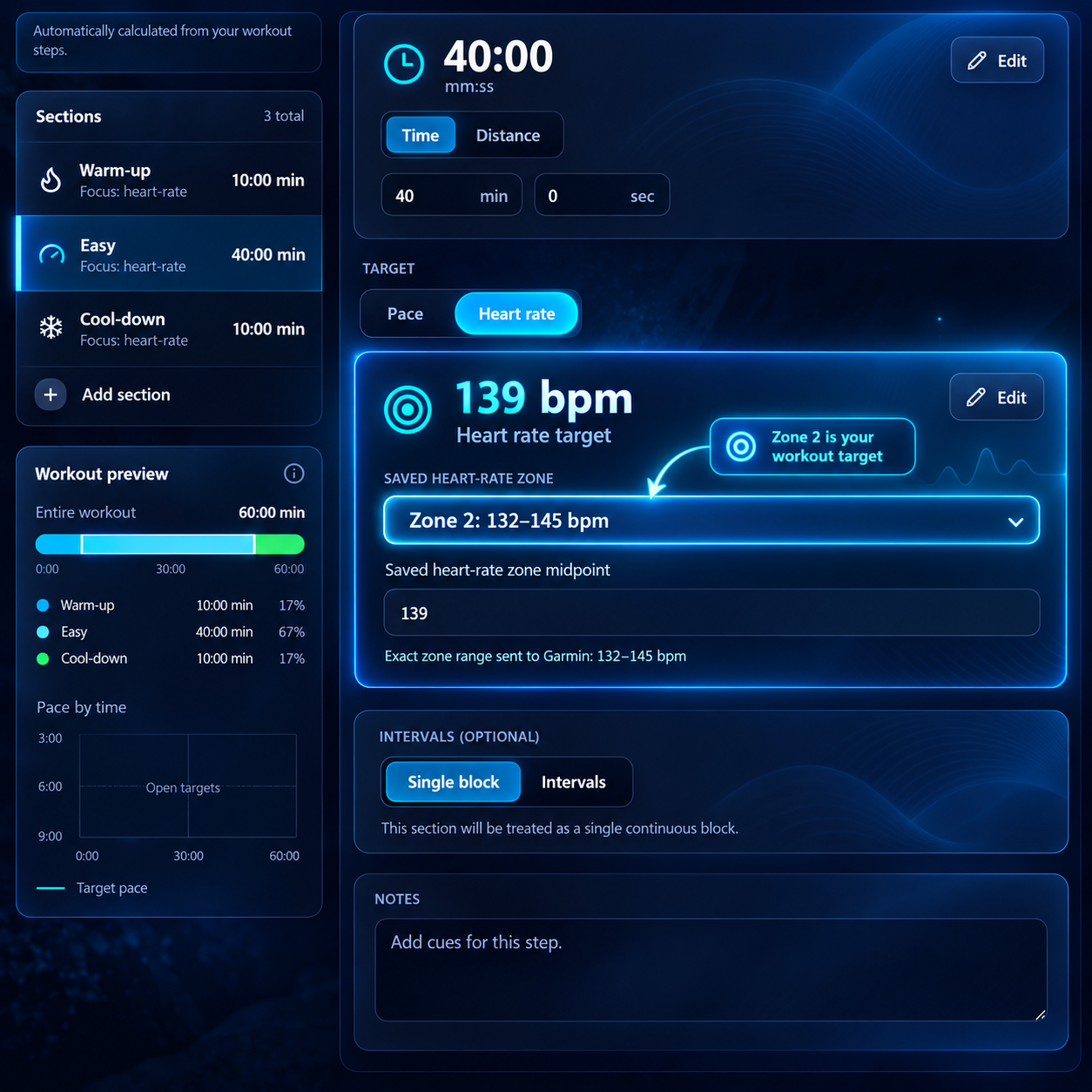
That distinction matters when you are running: a range gives you room to settle into the intended effort while still making the workout’s limit clear on your watch. For a session with multiple steps, you can select the appropriate saved zone for each one. The guide to sending a structured workout to Garmin covers the next step.
Set your zones, then build your run
Calculate your heart rate ranges, save them to My Account, and turn Zone 2 into a structured workout with the complete BPM range.
Calculate your heart rate zonesRunSync
Build your next Garmin-ready workout
Turn the session in your head into a structured workout you can review, save, schedule, or send to Garmin.
Open Run Builder