I Built a Garmin Race Data Field to Go With RunSync
RunSync makes structured Garmin workouts easier to build. RunSync Race is a Garmin Connect IQ data field that makes the active race plan easier to follow on your watch.
Creating a structured Garmin workout should not be harder than doing the workout. That is the idea behind RunSync: build the session you actually want, then send it to Garmin.
While training for a half marathon, I realised that getting the workout onto the watch was only half the problem. I also wanted one watch screen that made the plan easy to execute while racing.
So I built one: RunSync Race, a Garmin Connect IQ data field for following a structured running workout.
The problem was no longer getting the workout onto Garmin
With RunSync, I can build a negative-split race plan like this:
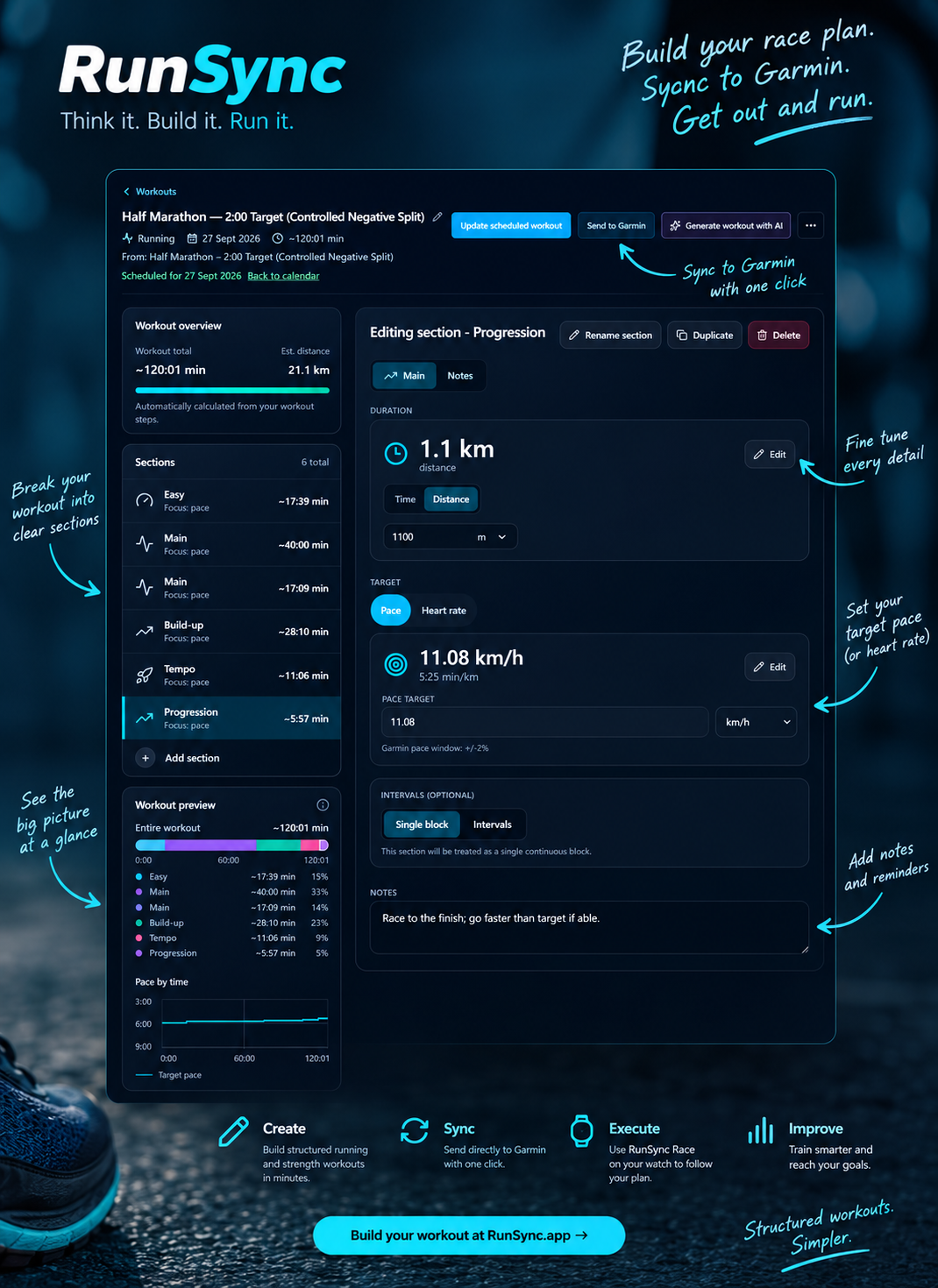
3 km @ 6:00/km
7 km @ 5:50/km
8 km @ 5:45/km
2 km @ 5:40/km
1.1 km @ 5:30/km
I can sync that plan to Garmin, start it on the watch and let Garmin move through the stages.
But during a race, I do not want to keep changing screens or interpreting a collection of separate fields. At a glance, I want to know:
- What pace should I be running?
- What pace am I running now?
- Am I executing this stage of the plan well?
- How much is left in the current stage?
- How is the race going overall?
Fitting those answers onto a 260 × 260 pixel circular screen without creating an unreadable mess became the real design problem.
RunSync Race reads the active Garmin workout
RunSync Race is designed around the structured workout that is already running on the Garmin. It does not need a separate copy of the race plan.
RunSync → build the structured workout → sync it to Garmin → start the workout → run with RunSync Race
That is important because the target pace comes straight from the current Garmin workout step. If the active stage is 7 km at 5:50/km, the data field can show 5:50/km without asking you to configure the same target again.
RunSync makes that first part easier, but the data field is not locked to RunSync. A compatible structured workout created elsewhere can work too, as long as it is active on the watch.
The information hierarchy on the watch
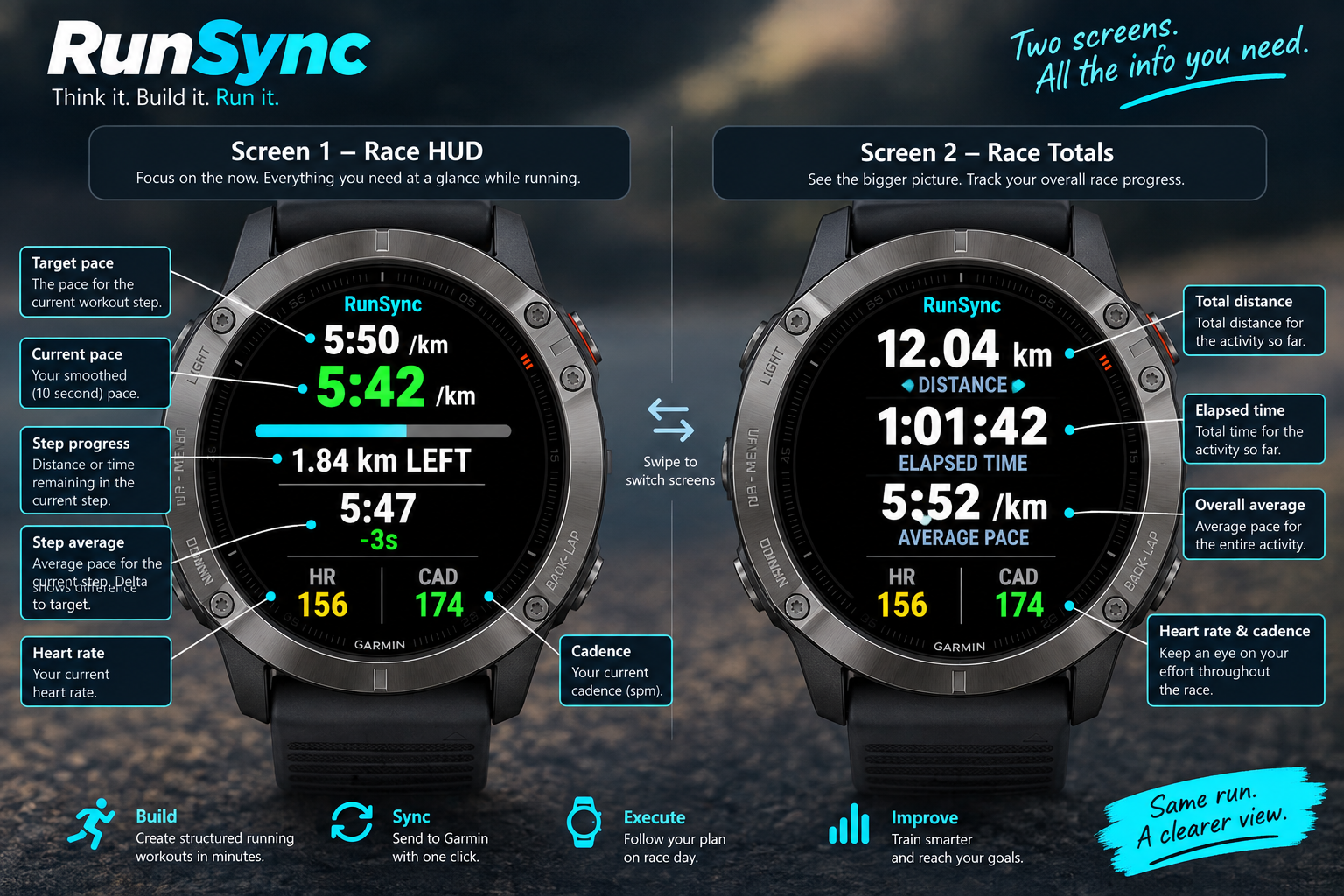
The screen is organised to answer the most useful questions first:
- Target pace: what should I be doing in this workout stage?
- Current pace: what am I doing right now?
- Step average: how well am I executing the whole stage?
- Overall average: how is the race going so far?
- Progress: how far, or how long, remains in this stage?
Heart rate, cadence, activity distance and elapsed time stay visible too, but they do not compete with the pacing information.
Target pace and current pace
The smaller pace at the top is the target from the active Garmin workout step. The large central value is current pace.
Raw GPS pace can move around too much to be a useful pacing signal on its own, so current pace uses Garmin’s speed data over a rolling ten-second average before converting it to pace. It is responsive enough to show a change in effort without encouraging a reaction to every small fluctuation.
The current pace is colour-coded against the target:
- Green: faster than target
- White: around target
- Red: slower than target
STEP AVG: the pacing number I expect to trust most
Instantaneous pace is helpful, but it is not always the number to act on. A downhill, a GPS wobble or a brief acceleration around another runner can all change it.
STEP AVG shows the average pace for the current workout stage, together with the difference from its target. If the plan calls for 7 km at 5:50/km and STEP AVG reads 5:47/km with -3s, I am averaging three seconds per kilometre faster than planned for that stage.
That creates two useful timescales:
| Metric | Question it answers |
|---|---|
| Current pace | What am I doing right now? |
| STEP AVG | How am I executing this stage? |
| AVG | How am I doing across the whole race? |
Progress beats another pace gauge
An early version of the field used a faster/slower gauge. It looked good, but it largely repeated what the colour-coded current pace and STEP AVG already said.
Removing it made room for something more valuable: progress through the active workout step. For a distance stage, the field shows the distance remaining; for a timed stage, it can show the remaining time.
When the work gets hard, knowing there is 1.84 km left in a 7 km block is much more actionable than simply knowing that the block exists.
Designing for an older Garmin was a useful constraint
I am developing the field on a Garmin fēnix 6 Sapphire. Its 260 × 260 pixel display is small, and the circular screen reduces the usable area further.
That limitation has been helpful. Every label and number has to earn its place. I removed labels such as TARGET PACE and 10 SECOND PACE where the visual hierarchy already made the meaning clear, and I removed the duplicate gauge to create room for step progress.
The goal is not to display every possible metric. It is to make the useful ones readable while running.
A performance lesson from the real watch
The first rolling-pace implementation used a dynamically managed collection of historical samples. It behaved in the simulator, but on the physical watch it eventually hit a watchdog error because it took too long to execute.
The implementation is now deliberately simpler: a small fixed set of scalar values rather than continually manipulating dynamic collections. It is less elegant code, but much more appropriate for something I want to trust late in a half marathon.
The simulator compiling successfully is not the test. The watch is the test.
Plan, sync, execute
RunSync began as a way to make structured workouts easier to create. RunSync Race makes the next part of that workflow easier to follow:
Plan → sync → execute
RunSync helps create the workout. Garmin executes the structured plan. RunSync Race presents the information that matters while you run it.
The next phase is testing it in real training, then at a half marathon. The measure of success is simple: I should be thinking about my pacing, not the data field on my wrist.
Source code and Garmin Connect IQ availability
The source code is available now in the public RunSyncRace GitHub repository. I plan to publish RunSync Race to the Garmin Connect IQ store when I have time; until then, the repository is the best place to follow the project or try it yourself.
Build your next structured Garmin workout
Create a race plan or training session in RunSync, sync it to Garmin and follow it from your watch.
Create a workout with RunSync →RunSync
Build your next Garmin-ready workout
Turn the session in your head into a structured workout you can review, save, schedule, or send to Garmin.
Open Run Builder