Why your running workouts should use your latest training paces
Training paces change as your fitness changes. Learn why structured Garmin workouts work better with current pace targets and how RunSync helps keep templates useful.
A structured running workout is only useful if the targets make sense.
Too easy, and the session may not give you the training effect you wanted. Too hard, and the workout becomes unrealistic, inconsistent, or turns into a race you were never meant to run.
That is why training paces matter.
If you are building workouts for Garmin, the structure is only half the job. You also need pace targets that match the purpose of each section: easy, steady, tempo, threshold, interval, recovery, and faster repetitions.
RunSync is built to make that loop easier:
Set your current training paces, use them when building structured workouts, then send the session to Garmin with targets that reflect the runner you are now.
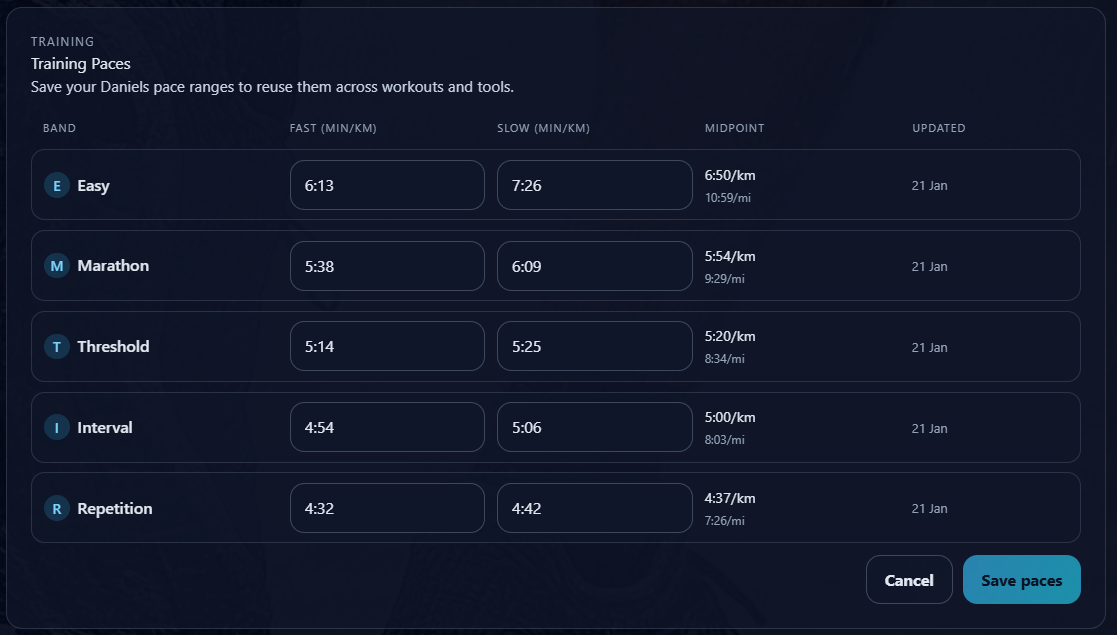
Your paces change over time
Your current training paces are not fixed forever.
They change as your fitness improves, as you return from illness or injury, as you move into a new training block, or after you run a recent race.
A pace that was right three months ago might be too slow now.
A pace that felt comfortable before a break might be too aggressive today.
This is one of the problems with reusable workout templates. The structure might still be useful, but the targets inside it can go stale.
Reusable interval template
- Warm up: 10 minutes easy
- Repeat 5 times: 3 minutes at interval pace, then 2 minutes recovery
- Cool down: 10 minutes easy
That workout structure might be useful all year.
The pace targets should change as you change.
Why stale pace targets cause problems
Hard-coded targets create maintenance work.
If your threshold pace changes, you may need to update every threshold workout. If your easy pace changes, you may need to check every template. If you create a workout from an old plan, you have to remember whether the paces still reflect your current fitness.
That adds friction, and friction is where good training habits often break down.
Stale targets can also change the purpose of the workout:
- An easy run becomes too fast to recover from.
- A threshold session drifts into race effort.
- Intervals become too aggressive to complete cleanly.
- Recoveries become too fast to recover.
- A useful template becomes something you no longer trust.
A runner should not have to rebuild the same workout every time their fitness moves forward.
Store your training paces once
RunSync’s training paces feature is designed to reduce that maintenance.
You can set current paces from a recent race, time trial, benchmark workout, or training block.
For example, you might store:
- Recovery pace
- Easy pace
- Steady pace
- Tempo pace
- Threshold pace
- Interval pace
- Repetition pace
Once those paces are saved, RunSync can use them when creating workouts from templates. Saving training paces is available for signed-in runners on plans that include saved training paces.
That means a workout template can say:
Threshold template
- Warm up: 10 minutes easy
- Repeat 4 times: 5 minutes at threshold pace, then 2 minutes easy recovery
- Cool down: 10 minutes easy
Instead of forcing you to enter the actual pace range every time, RunSync can apply your latest saved threshold and recovery paces when you build the workout.
Templates become more useful
Workout templates are powerful because most runners repeat the same types of sessions.
You might regularly use:
- 5 x 3 minutes hard
- 3 x 8 minutes threshold
- 20 minute tempo run
- Easy run with strides
- Progression run
- Long run with a steady finish
The structure does not need to change every week.
The paces do.
By separating the template from the pace values, RunSync keeps the workout reusable without making it stale.
You choose the session. RunSync fills in the targets using your latest training paces.
When should you update your paces?
You do not need to update your training paces after every run.
That can make training noisy and reactive. Useful times to update include:
- After a recent race or time trial.
- At the start of a new training block.
- After returning from illness, injury, or a long break.
- When several weeks of workouts feel clearly too easy or too hard.
- When your goal changes and the next block needs different emphasis.
For many runners, updating paces once per training block is enough.
If you have a recent 5k, the guide to turning a 5k into useful training paces gives a practical way to choose starting targets.
A better way to start a training block
This is especially useful at the start of a new block.
Instead of editing every workout one by one, you can update your training paces once, then build the next set of sessions from templates.
That keeps the plan aligned with where your fitness is now, not where it used to be.
It also makes the block easier to execute. The workouts are not just planned; they are built around targets you can actually use.
For the broader planning workflow, see how to improve your running with a simple training block.
Why this matters on the run
Good pacing helps you run the session as intended.
An easy run should feel easy.
A threshold session should feel controlled and sustainable.
Intervals should be challenging, but not so hard that the session falls apart.
When your watch has the right workout structure and the right pace targets, you can focus on running rather than calculating.
You do not need to remember the target pace for each section. You do not need to second-guess whether an old workout is still accurate. You can trust the workout and get on with the session.
If you are ready to send a structured session to your watch, the Garmin guide explains how to sync a workout to Garmin from RunSync.
Keep the workout useful
RunSync is not trying to make training more complicated.
It is trying to make structured training easier to follow.
Set your current paces. Choose a workout template. Build the workout with the right targets. Send it to Garmin. Run the session.
The less time you spend editing old workouts, the more time you can spend actually training.
Ready to make your workouts match your current fitness?
Calculate your latest training paces in RunSync, create structured workouts from templates, and let your Garmin guide each section with useful targets.
Create your training paces