How to sync a workout to Garmin from RunSync
Build a structured running workout in RunSync, connect Garmin, send or schedule the session, and follow the workout prompts on your watch.
If you have ever tried to get a proper interval session onto your Garmin watch, you have probably hit at least one of these problems:
- The workout becomes a messy list of steps you do not trust mid-run.
- You spend longer building the session than actually doing it.
- You write the workout somewhere else and keep checking it while running.
- You give up and do it roughly by feel, even though the structure mattered.
RunSync is built to make structured workouts quick to create, easy to read, and simple to send to Garmin.
The goal is:
Plan the workout once. Let the watch guide the session.
How to sync a workout to Garmin
The short version:
- Build the workout in Run Builder.
- Connect your Garmin account.
- Send the workout now or schedule it for a date.
- Open Garmin Connect or your watch and run the session.
That is the basic loop behind RunSync. You create the structure before the run, then Garmin handles the prompts when it is time to execute.
If you want the broader story behind the product, I wrote about why I created RunSync.
What you will build
Here is a classic interval session that works for a lot of runners:
Example interval workout
- Warm up: 15 minutes easy
- Repeat 6 times: 3 minutes comfortably hard, then 2 minutes easy jog
- Cool down: 10 minutes easy
Simple structure. Clear purpose. No need to remember every step while you are working hard.
You can build the same kind of session for tempo runs, threshold workouts, progression runs, hill reps, easy runs with strides, or long runs with steady sections.
Step 1: Build the workout in RunSync
In RunSync, workouts are built as clear sections: warm-up, main work, recoveries, repeat blocks, and cool-down.
That matters because a good Garmin workout should be easy to understand before you send it. If the structure is confusing on the screen, it will feel worse when you are halfway through the session.
For the example above, the workout becomes:
- Warm up for 15 minutes.
- Repeat the main set 6 times.
- Run 3 minutes strong.
- Recover for 2 minutes easy.
- Cool down for 10 minutes.
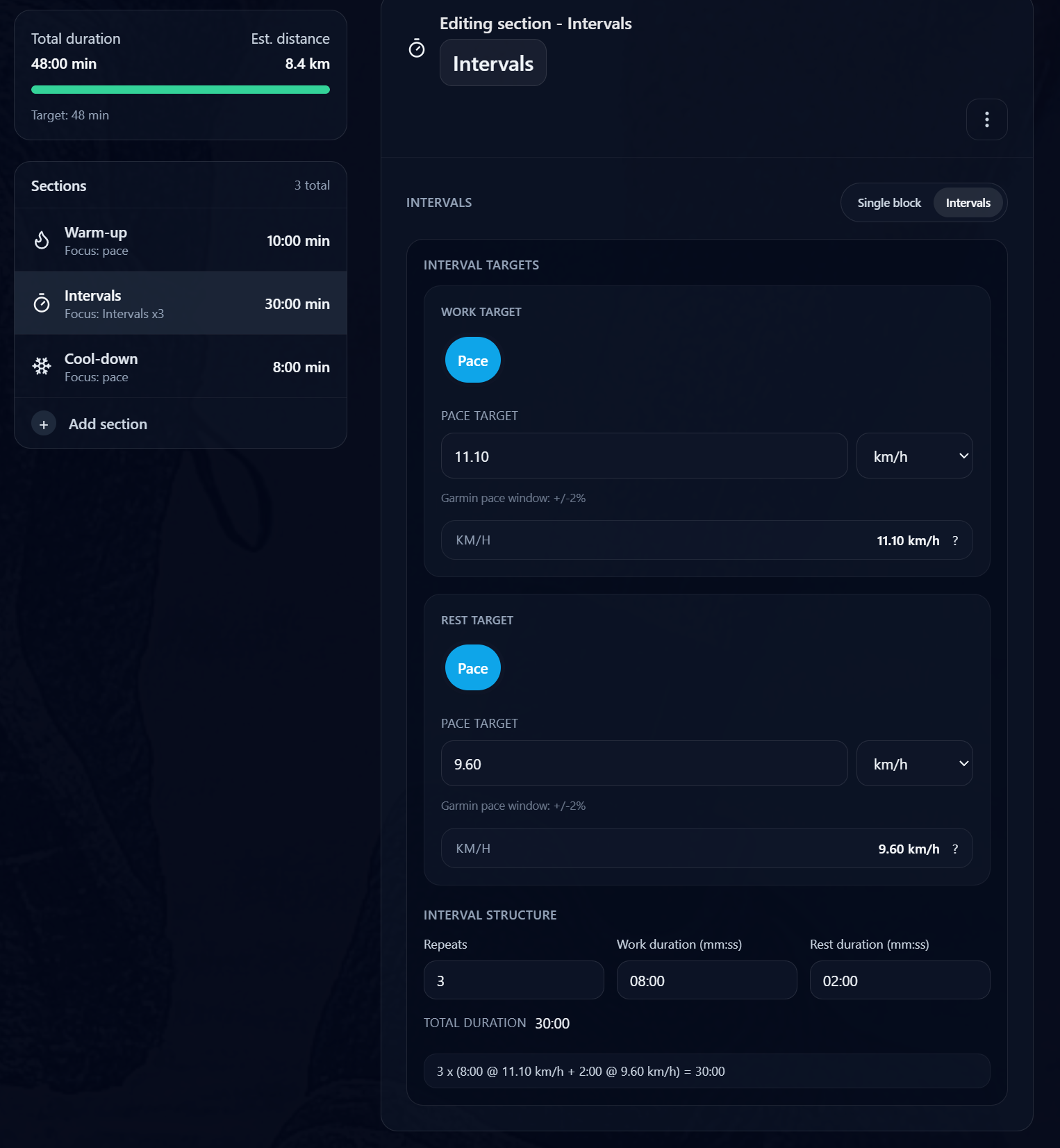
If you are unsure on targets, start with effort:
- Warm-up and recoveries should feel easy and conversational.
- Intervals should feel hard but controlled.
- Cool-down should bring the effort back down.
Pace targets can help once you know your current fitness. If your paces have changed recently, the guide to using your latest training paces explains why stale workout targets can make a good session harder to execute well.
Step 2: Connect your Garmin account
Before RunSync can send workouts to Garmin, you need to connect your Garmin account.
When you connect Garmin, RunSync uses OAuth 2.0 with PKCE. In plain English, you sign in with Garmin, grant permission, and RunSync receives permission to sync workouts without you handing over your Garmin password to RunSync.
Once Garmin is connected, RunSync can send compatible structured workouts to your Garmin account.
Step 3: Send or schedule the workout
You have two useful options.
You can send the workout straight away if you are about to run it, or you can schedule it for a specific date so it appears when you need it.
Under the hood, Garmin treats the workout and the schedule as related but separate pieces:
- The workout contains the steps, durations, targets, and repeats.
- The schedule places that workout on a specific date.
That separation is useful. It means you can build a session once, then use it in the context of a training week instead of treating every workout as a one-off task.
If you are planning more than one session, the training block guide shows how to structure a simple running block and send workouts to Garmin.
Step 4: Open Garmin Connect or your watch
Once the workout is synced, you can open Garmin Connect or check your watch.
The point is not just that the workout exists somewhere in your account. The point is that the structure is ready to follow when you start running.
On the watch, that means the session can guide you through the sequence:
- Warm up.
- Start the interval.
- Recover.
- Repeat.
- Cool down.
No printed notes. No phone checks. No “wait, how many reps was that?”
Why this is better than remembering the workout
Some workouts are easy to remember. A 30-minute easy run does not need much help.
Intervals are different.
Once effort rises, memory gets less reliable. It is easy to miscount reps, shorten recoveries, run the wrong target, or turn a controlled workout into a test of fitness.
A watch prompt helps protect the purpose of the session.
For a good interval workout, that purpose is not usually “run as hard as possible.” It is more often:
- Hit controlled efforts.
- Recover properly.
- Complete the full set.
- Finish with enough control to train again.
Putting the workout on your Garmin makes that much easier to do.
A simple RunSync workflow
In practice, the workflow looks like this:
- Choose the job of the workout.
- Build the warm-up, main set, recoveries, and cool-down.
- Add effort or pace targets where useful.
- Connect Garmin.
- Send the workout now, or schedule it for the right day.
- Start the workout on your watch and follow the prompts.
That is the value of RunSync: it closes the gap between the workout you planned and the session you actually run.
Ready to send your next workout to Garmin?
Build a structured workout in RunSync, connect Garmin, and let your watch guide each step of the session.
Build a Garmin workout