How I use RunSync to plan my running week
A practical look at how I use RunSync to turn Garmin and Runalyze data into a weekly training plan, schedule structured workouts, and auto-sync sessions to my Garmin watch.
RunSync started with a very personal frustration: I wanted a better way to get my own workouts onto my Garmin watch.
I did not want to rely only on pre-built plans. I did not want to rebuild the same sessions in Garmin every week. And I definitely did not want to decide the workout while standing by the door, already in my running kit, feeling a little too optimistic.
I wanted one simple loop:
That is the real value of RunSync for me. It is not just a workout builder. It is a way to turn the next week of training into something clear, realistic, and ready to follow.
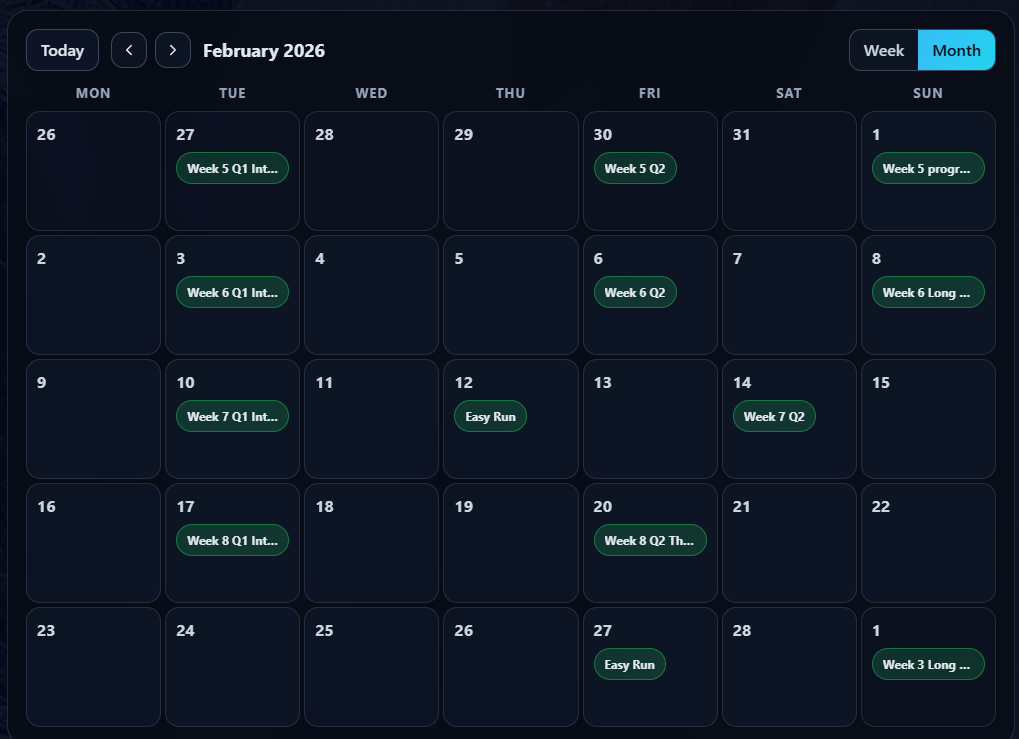
No last-minute workout building. No trying to remember interval structures. No changing the plan five minutes before a run because the day feels better than the data says it is.
Just make the decision once, then let the watch guide the session.
Start with the job of the week
Before I create a workout, I decide what the training is meant to do.
Sometimes that means building towards a 10k or half marathon. Sometimes it is a short block focused on threshold work, consistency, or getting back into rhythm after a messy few weeks.
The important thing is that the week has a job.
Example training focus
- Goal
- Run a stronger 10k in 10 weeks
- Target
- Hold race pace more comfortably on the day
- Current gap
- Threshold effort is not yet controlled enough
- Focus
- Build the ability to hold controlled discomfort for longer
I do not have lab testing, lactate measurements, or anything overly complex. I use what I actually have: recent runs, key workouts, heart rate, perceived effort, Garmin metrics, and Runalyze trends.
The goal is not to find a perfect number. It is to choose a starting point that is honest enough to train from consistently.
Work backwards from race day
Once the goal is clear, I work backwards.
If I want to hold a certain pace on race day, I need to understand the gap between that target and what I can currently sustain. For threshold-style work, I might begin with something modest:
Starter threshold session
- 5 x 2 minutes at threshold effort
- 2 minutes easy recovery between reps
- 10 minutes total threshold work
Early in a block, that can feel surprisingly hard. That is useful information. It tells me where I am, not where I wish I was.
Heart rate helps here. Pace tells me how fast I am running, but heart rate gives me a better sense of the cost. If it climbs too quickly and keeps rising, the session may be drifting away from controlled threshold work and towards race effort. If it stays very low and the run feels too comfortable, I may not be getting the stimulus I wanted.
The middle ground is the target: hard enough to matter, controlled enough to repeat.
Over the next few weeks, the aim is not always to run every rep faster. More often, I want to extend the amount of controlled work I can complete.
That moves the session from 10 minutes of threshold work to 24 minutes.
At the start, 10 minutes might feel hard. Later, 3 x 8 minutes should feel like controlled pressure: uncomfortable, but manageable. Ideally, I finish feeling like I could have done one more rep if I really had to.
That feeling matters. A threshold session should feel like work I can control, not a race I survived.
Build the session once
This is where RunSync fits into the loop.
Once I know the progression, I can create the workouts I need, schedule them, and send them to Garmin.
Example RunSync workout
- Warm up: 10 minutes easy
- Repeat 3 times: 8 minutes at threshold pace, then 2 minutes easy recovery
- Cool down: 10 minutes easy
That is not a complicated workout. It is exactly the kind of session I do not want to manage manually while running.
I want the watch to tell me what comes next. I want the correct pace target already set. I want the recovery sections clearly defined. And I want to avoid changing the session on the day just because I feel impatient.
If you are new to the app, the getting started guide covers the basic RunSync workflow.
Review what actually happened
After the run, Garmin gives me the immediate training data. Then I use Runalyze to review the wider picture.
I am not trying to obsess over every metric. I am trying to avoid relying only on memory or mood.
Some sessions feel worse than they really were. Some feel better than the data suggests. Looking at both subjective feel and objective data gives me a more useful view.
The questions I care about are simple:
- Was the pace realistic?
- Did heart rate behave as expected?
- Did the session feel controlled or forced?
- Am I recovering between harder sessions?
- Is the trend moving in the right direction?
- Was the week too hard overall?
That review gives the next week a better starting point.
Adjust the next week
Once a week, I spend 10 to 15 minutes reviewing the previous few sessions and updating the next week.
I look at recent training history, how the key workouts felt, the heart-rate and pace relationship, Garmin health and performance metrics, Runalyze trends, sleep, recovery, work, family commitments, and the time I realistically have available.
That last part matters.
A training plan that ignores real life is not a good training plan.
If the next week is stressful, busy, or short on sleep, I might reduce the load. If I have more space, I might keep the planned progression. If a session felt too hard, I might repeat it rather than force the next step.
This is one of the biggest benefits of weekly planning. You are not blindly following a plan written weeks ago, but you are also not making everything up on the day.
For a broader example, I wrote about how to improve your running with a simple training block.
Protect easy days from ambition
One reason I like planning ahead is that it protects me from myself.
If I decide what to run while I am already in my kit, I am much more likely to overdo it.
That can feel productive in the moment, but it usually catches up with you.
RunSync helps by separating planning from execution. I make the decision when I am calm, looking at the whole week, with the data in front of me. Then, when it is time to run, I follow the workout.
That is especially useful for easy days. If the plan says easy, the watch helps keep it easy.
Let Garmin get the right workout on the right day
The feature I now find most useful is auto-sync for scheduled workouts.
I did not want to create a workout, manually send it to Garmin, remember when I planned to run it, and repeat that process every week. I wanted to schedule the session once and trust that it would be there on the day.
That is why RunSync can auto-sync scheduled workouts to Garmin when Garmin is connected and auto-send is enabled.
If I schedule a workout for Tuesday, RunSync sends it to Garmin on Tuesday. I do not need to log in again, send it the night before, or keep the whole training block sitting on the watch.
The right workout appears at the right time.
Set it and forget it.
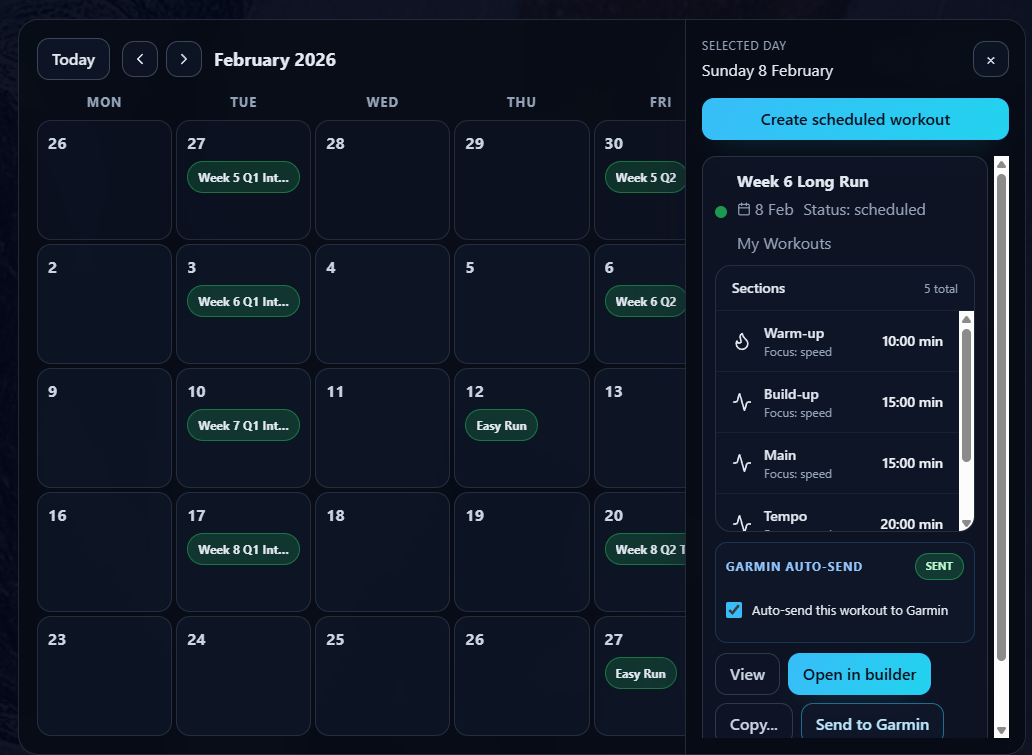
That started as a feature I wanted for myself. Now it is one of the parts of RunSync I rely on most. Once you get used to planning the week, scheduling the workouts, and trusting that they will be ready when you need them, it is hard to go back.
My weekly RunSync routine
In practice, my routine looks like this:
- Review last week's runs in Garmin and Runalyze.
- Check how the key session felt against the data.
- Look at recovery, stress, sleep, and the next week's calendar.
- Decide whether to progress, repeat, or reduce the next workout.
- Update the workouts in RunSync.
- Schedule them for the right days.
- Let RunSync auto-send them to Garmin.
- Run the sessions as planned.
That is it. The planning is deliberate, but not complicated.
The aim is to make the right decision once, then remove as much friction as possible.
Why this works for me
RunSync is not about creating the most advanced training system possible. It is about making good training easier to follow.
For me, that means:
- Clear goals
- Simple workout progressions
- Weekly review
- Sensible adjustments
- Less day-of decision making
- Workouts ready on the watch when I need them
That combination helps me train with more consistency and less guesswork. It also helps stop me turning every run into a test of fitness.
Some days are for work. Some days are for recovery. Some days are for building confidence. The watch should support that plan, not tempt me into changing it halfway through.
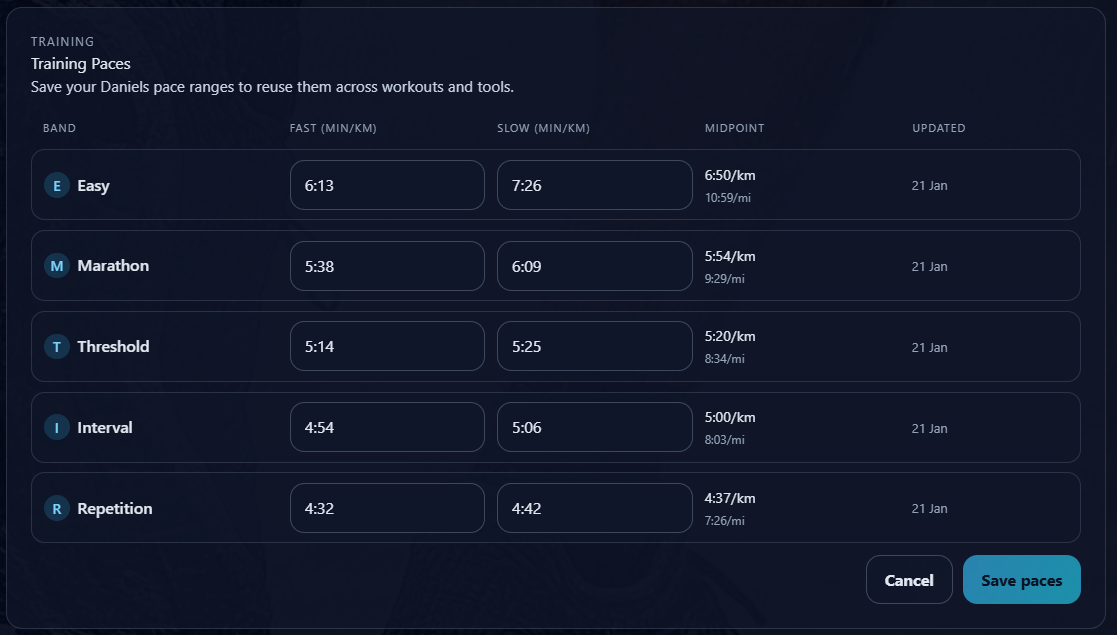
Pace targets are part of that. Using your latest training paces helps keep workouts aligned with the runner you are now, not the runner you were months ago.
Final thought
The real benefit of RunSync is not just that it sends workouts to Garmin.
It is that it closes the gap between planning and doing.
You can set a goal, build a sensible progression, review your data each week, adjust the next few sessions, and trust that the right workout will be ready when you need it.
Ten to fifteen minutes a week is enough to give the week structure. After that, you can stop thinking about the logistics and focus on the running.
Plan the week. Auto-sync the workouts. Run the plan.
Set it and forget it.
Ready to plan your next week of training?
Create your workouts in RunSync, schedule them for the right day, and let RunSync send them to Garmin when you need them.
Start planning with RunSync